Authenticate with the Strava API using stravalib#
To retrieve data from the Strava API, you must first authenticate with Strava. This page provides you with the information required to set up authentication with Strava.
Step 1: Create an application in your Strava account#
First, create a new application in your Strava account. To do this:
Login to your Strava account
Go to settings –> My API Application
Create a new application in your account
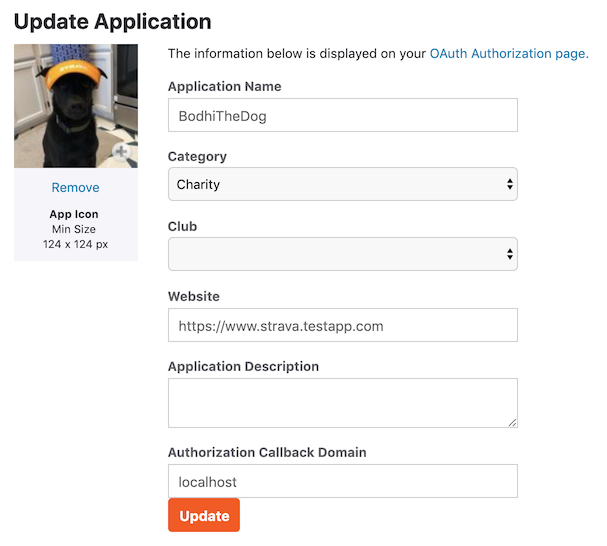
The above Strava documentation page image shows the Strava API create application page. The website value in this image is “localhost.” This value can be any value if you authenticate to gain local access to your Strava data. But if you plan to build a web application, you should place the URL of your application in that field.#
More resources on setting up a Strava app
If you want a more technical overview, see the official Strava documentation
Requesting Authorization#
Once you have set up your Strava API app, you are ready to authenticate.
The stravalib.client.Client class contains the
stravalib.client.Client.authorization_url() method
that builds an authorization URL. This URL can be clicked on by a user or used locally to
grant your application access to Strava account data.
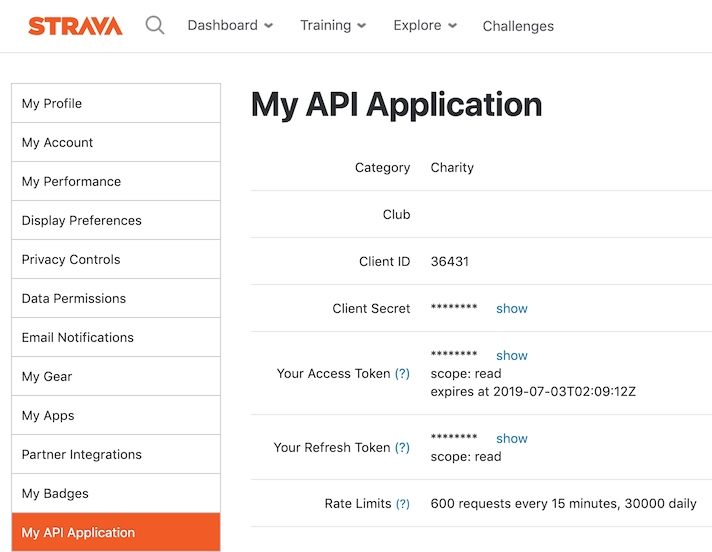
An image from the Strava documentation page shows what your API page will look like after you have created your app above. For the step below, you will need the Client ID value provided in your app.#
from stravalib import Client

client = Client()
url = client.authorization_url(
    client_id=REPLACE_WITH_YOUR_CLIENT_ID,
    redirect_uri="http://myapp.example.com/authorization",
)
Note that you can use localhost or 127.0.0.1 as the redirect host for local development.
url = client.authorization_url(
    client_id=REPLACE_WITH_YOUR_CLIENT_ID,
    redirect_uri="http://127.0.0.1:5000/authorization",
)
print(url)
# Output:
# 'https://www.strava.com/oauth/authorize?client_id=YOURCLIENTIDHERE&redirect_uri=http%3A%2F%2F127.0.0.1%3A5000%2Fauthorization&approval_prompt=auto&scope=read%2Cactivity%3Aread&response_type=code'
Once you have the URL value, you can display it in your web application to allow athletes to authorize your application to read their data. If you are trying to authenticate locally, paste the URL into your browser to support exchanging the temporary code Strava provides for a temporary access token.
If you are using localhost, the URL looks something like this:
http://127.0.0.1:5000/authorization?state=&code=234234235874c642aaaca70a702f4494965b3bf003&scope=read,activity:read
While the above URL, a local development URL, may look like a broken link in your browser, it is correct. Notice the code=longstringhere in the URL. Next, you will exchange that code value for a token.
The token is what you will use to access your (or a user’s if they authenticate using your app) Strava data.
To exchange the code for a token:
Return to your Strava app on the Strava website and copy the Client Secret value.
Use the Client Secret value with the
client_idvalue inclient.exchange_code_for_token().
token_response = client.exchange_code_for_token(
    client_id=MY_STRAVA_CLIENT_ID, client_secret=MY_STRAVA_CLIENT_SECRET, code=code
)
# The token response above contains both an access_token and a refresh token.
access_token = token_response["access_token"]
refresh_token = token_response["refresh_token"]  # You'll need this in 6 hours
The resulting access_token is valid until the specified expiration time; for Strava, this time is 6 hours,
specified as unix epoch seconds. You can see the expiration time by looking at the expires_at field of the returned token.
Alternatively, you or a user can explicitly revoke application access.
You can store this token value to access the account data in the future without requiring re-authorization. However, you must refresh the token after the 6-hour expiration period.
Once you have an access token, you can begin to interact with the Strava API to access user data for the authenticated account.
from stravalib import Client

client = Client(access_token=STORED_ACCESS_TOKEN)
client.get_athlete()  # Get current athlete details
To refresh the token, you call the stravalib.client.Client.refresh_access_token() method.
from stravalib import Client

client = Client()
token_response = client.refresh_access_token(
    client_id=MY_STRAVA_CLIENT_ID,
    client_secret=MY_STRAVA_CLIENT_SECRET,
    refresh_token=last_refresh_token,
)
new_access_token = token_response["access_token"]
Note
See the strava-oauth directory for an example of a Flask application that fetches a Strava authentication token.