Stravalib build and release guide#
This page outlines stravalib’s release, build and PyPI deployment workflow.
Stravalib packaging overview#
For packaging, we use setuptools for packaging and the build package to
create a wheel and distribution for pushing to PyPI.
Package versioning#
To keep track of stravalib versioning, we use setuptools_scm. Setuptools_scm
uses the most current tag in the repository
to determine what version of the package is being built.
setuptools_scm creates a _version_generated.py file upon build using that tag.
Warning
If you build the package locally, the _version_generated.py file should NEVER
be committed to version control. It should be ignored via our .gitignore file
If you wish to build stravalib locally to check out the .whl and source distribution (sdist) run:
nox -s build
When you run this, nox will:
create a
distdirectory with the wheel and the package sdist tarball. You can see the version ofstravalibin the name of those files:
dist/
   stravalib-1.0.0.post27-py3-non-any.whl
   stravalib-1.0.0.post27.tar.gz
invoke build to call
setuptools_scmto create a_version_generated.pyfile in the stravalib package directory:
stravalib/
    stravalib/
        _version_generated.py
Our PyPI release workflow#
Our release workflow is automated and can be triggered and run using the GitHub.com interface.
We follow semantic version best practices for our release workflow as follows:
MAJOR version when you make incompatible API changes
MINOR version when you add functionality in a backward-compatible manner
PATCH version when you make backward-compatible bug fixes
How to make a release to PyPI#
Note
The build workflow explained below will run on every merge to the main branch of stravalib to ensure that our distribution files are still valid.
To make a release:
✔️ 1. Determine with the other maintainers what release version we are moving to. This can be done in an issue.
✔️ 2. Create a new pull request using the release pull request template that does the following:
Organizes the changelog.md unreleased items into added, fixed, and changed sections
Lists contributors to this release using GitHub handles
Adds the version number of that specific release.
Below is an example of the changelog changes when we bumped to version 1.0 of stravalib. (Some of the original change log content is removed to keep this page shorter)
## Unreleased

## v1.0.0

### Added
* Add: Add an option to mute Strava activity on update (@ollyajoke, #227)
* Add Update make to build and serve docs and also run current tests (@lwasser,#263)
* Add: Move package to build / `setuptools_scm` for version / remove setup.py and add CI push to pypi (@lwasser, #259)

### Fixed
* Fix: add new attributes for bikes according to updates to Strava API to fix warning message (@huaminghuangtw, #239)
* Fix: Refactor deprecated unittest aliases for Python 3.11 compatibility (@tirkarthi, #223)
* Patch: Update readme and fix broken links in docs (@lwasser, #229)

### Changed
* Change: Refactor test suite and implement Ci for tests (@jsamoocha, #246)
* Change: Remove support for python 2.x (@yihong0618, #254)

### Contributors to this release
@jsamoocha, @yihong0618, @tirkarthi, @huaminghuangtw, @ollyajoke, @lwasser
✔️ 3. Once another maintainer approves the pull request, you can merge it.
You are now ready to make the actual release.
✔️ 4. In GitHub.com go to
Releasesand prepare a new release. When you create that release you can specify the tag for this release.
Use v in the tag number to maintain consistency with previous releases.
This is the ONLY manual step in the release workflow. Be sure to create the correct tag number: example v1.0.1 for a patch version.
Copy the updated changelog information into the release body or use the Generate Release Notes button to generate release notes automatically.
✔️ 5. Hit
publish release
When you publish the release, a GitHub action will be enabled that builds the wheel and SDist.
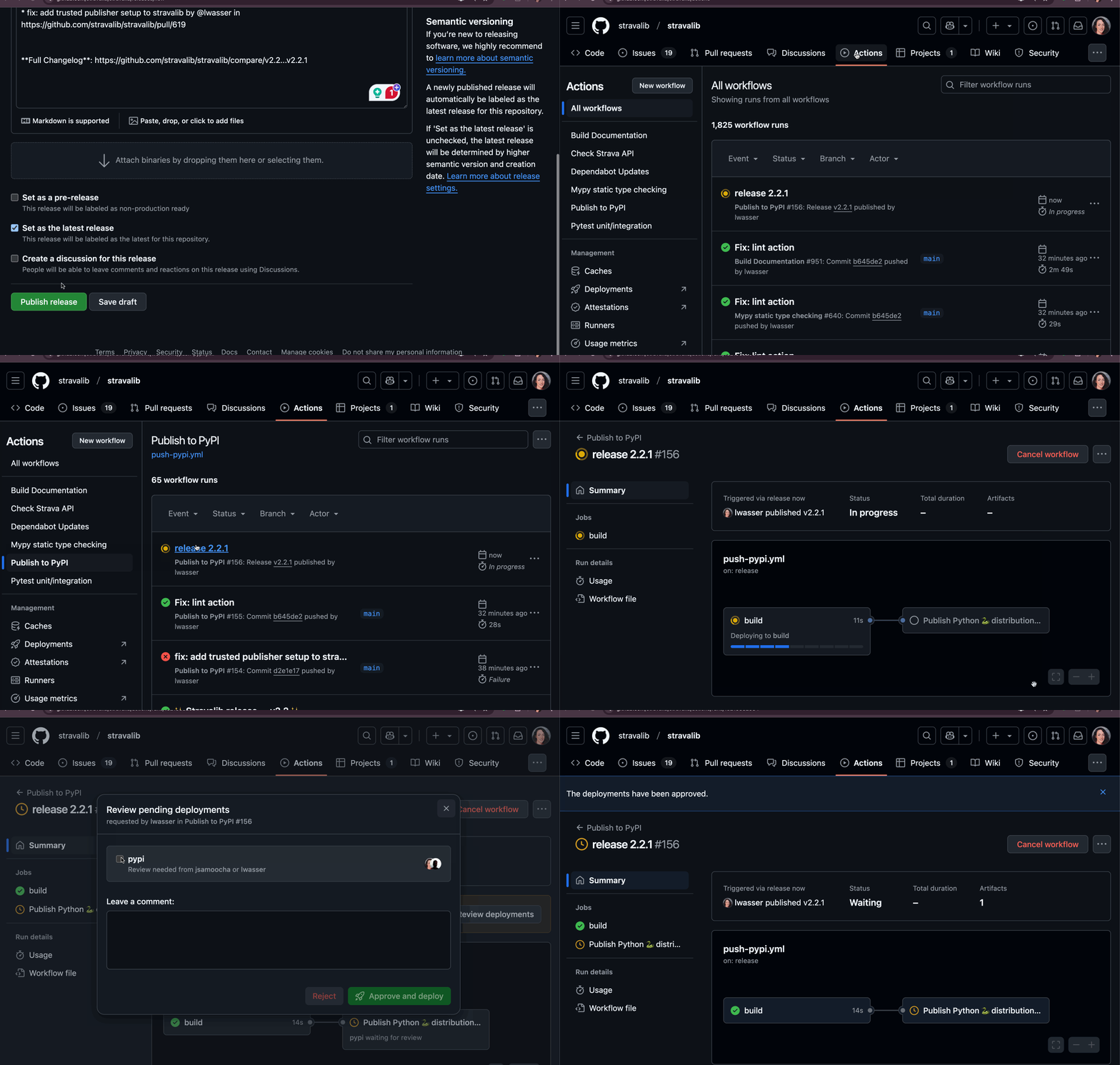
To initiate the publish to PyPI workflow, first create a new release. This will trigger the deployment build. To see that process in action, go to Actions –> the workflow that is running and you can watch progress. Once it builds successfully, it will wait to deploy until a maintainer approves the PyPI deployment.
Once you have created a release, a maintainer can approve the automated deployment process for stravalib by going to the actions tab and clicking on the current publish-pypi.yml workflow run.#
✔️ 6. Authorize the deploy step of the build: The final step is to authorize the deployment to PyPI. Our build uses a GitHub environment called PyPI that is connected to our stravalib PyPI account using PyPI’s trusted publisher workflow.
publish release. Only our core maintenance team can authorize an action to run using this environment.
Congratulations! You’ve just created a release of stravalib!